Estimated total from $18.41
Send Certified Mail Online With Tracking & Proof
How Certified Mail Online Works
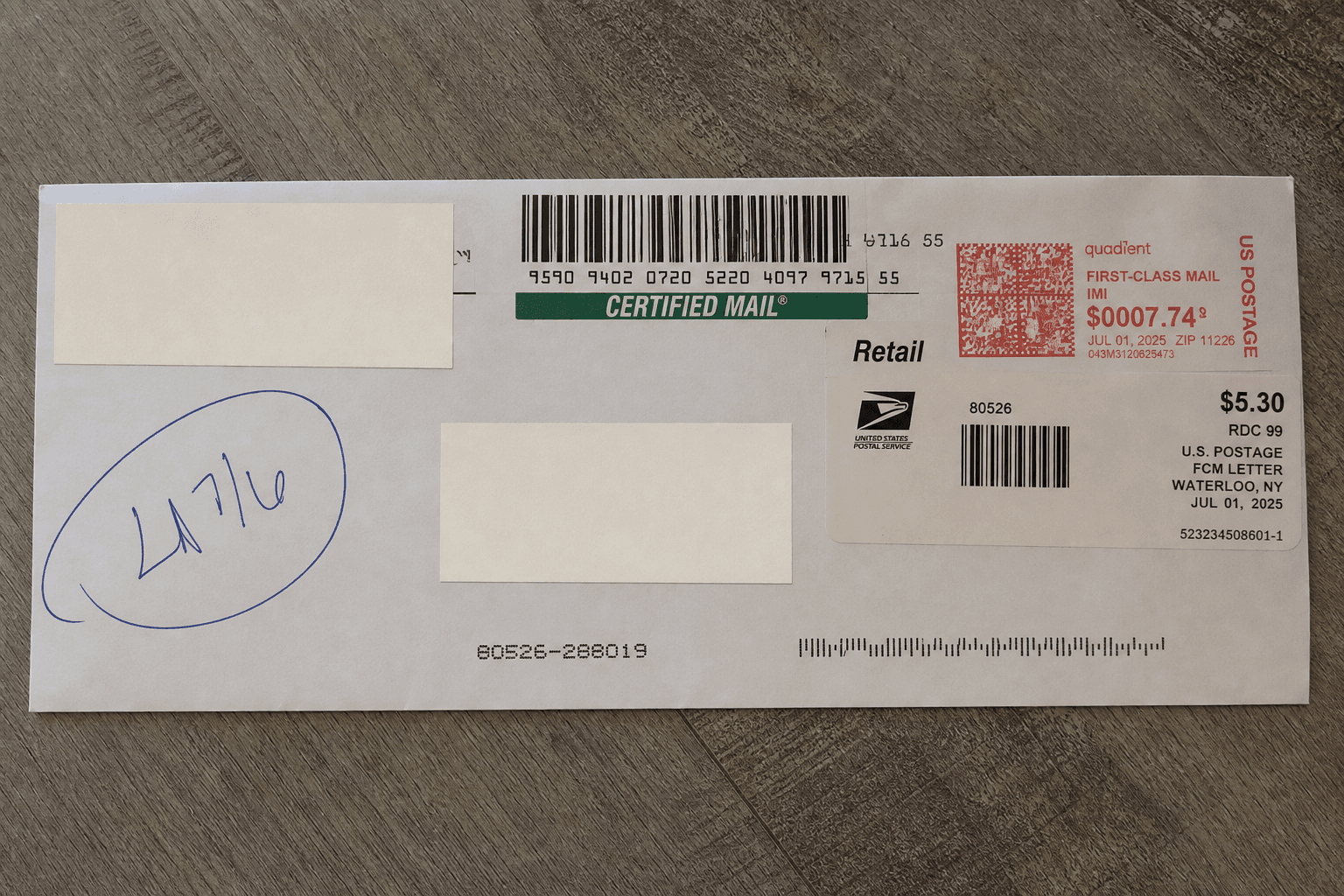
We handle printing, postage, and mailing. USPS handles delivery and tracking.
- 1
Upload or Type Your Letter
Upload a PDF, Word document, or image, or type your letter online.
- 2
Select Certified Mail
Choose the Certified Mail option you need, including electronic or paper Return Receipt and Restricted Delivery.
- 3
Track Your Mailing
Follow USPS delivery updates. Sign in before ordering to keep tracking and available receipts in your TLP dashboard.
Certified Mail Online vs. the Post Office
The Post Office is cheaper when you prepare the letter yourself. The Letter Pilot prints and mails it for you.
| What to compare | At the Post Office | The Letter Pilot |
|---|---|---|
| Basic cost | $6.37 in USPS fees for a standard one-ounce stamped First-Class letter. | $18.41 estimated for one black-and-white page, including printing, envelope, postage, service fee, and tax. |
| Preparation | Prepare and address your envelope. Bring it to the counter and request Certified Mail. | Upload or type your letter and enter the addresses. We handle printing, the envelope, and postage. |
| USPS handoff | USPS can accept a prepared letter at the counter the day you visit. | Orders placed by 8:00 PM Eastern Time Monday through Friday, except on postal holidays, are typically handed to USPS by the next USPS business day. |
| Mailing records | Ask the clerk for a postmarked mailing receipt. Use its tracking number to check USPS updates. | Sign in before ordering to see tracking and available receipts in Mail Jobs. Guests can check updates through USPS Tracking. |
Basic cost
- Post Office
- $6.37 in USPS fees for a standard one-ounce stamped First-Class letter.
- The Letter Pilot
- $18.41 estimated for one black-and-white page, including printing, envelope, postage, service fee, and tax.
Preparation
- Post Office
- Prepare and address your envelope. Bring it to the counter and request Certified Mail.
- The Letter Pilot
- Upload or type your letter and enter the addresses. We handle printing, the envelope, and postage.
USPS handoff
- Post Office
- USPS can accept a prepared letter at the counter the day you visit.
- The Letter Pilot
- Orders placed by 8:00 PM Eastern Time Monday through Friday, except on postal holidays, are typically handed to USPS by the next USPS business day.
Mailing records
- Post Office
- Ask the clerk for a postmarked mailing receipt. Use its tracking number to check USPS updates.
- The Letter Pilot
- Sign in before ordering to see tracking and available receipts in Mail Jobs. Guests can check updates through USPS Tracking.
Both options include proof of mailing and USPS tracking. A signature is required for delivery. Return Receipt costs extra and gives you a copy of the signature once USPS issues it.
From the Quick Send page
From your letter to USPS tracking
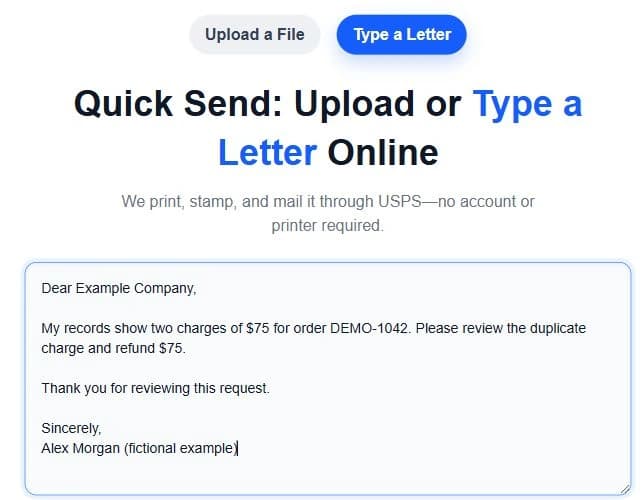
These screenshots show how to prepare a Certified Mail letter using fictional example details.
Upload or type your letter
Upload your document or select “Type a Letter.” If you start with a template, replace its placeholders and review the finished wording.
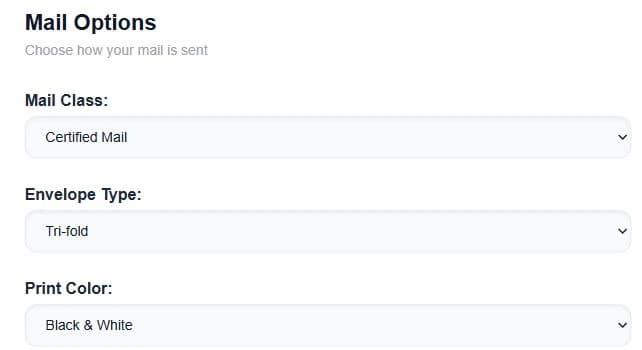
View full screenshot Add addresses and choose mail options
Enter the recipient and return address, then choose Certified Mail. Select “Certified Mail + Electronic Return Receipt” if you want that optional delivery record.
View full screenshot Review and pay
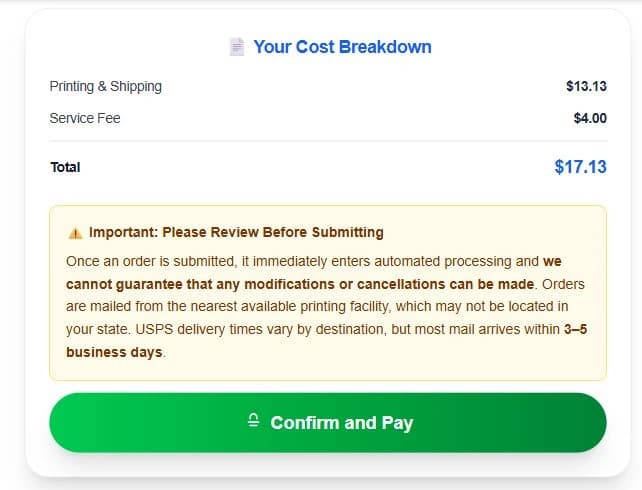
Review Your Cost Breakdown, including Printing & Shipping, Service Fee, and Total. “Confirm and Pay” prepares your mailing and opens Stripe checkout.
The amount shown is an example estimate. Your total depends on your document and selected mail options.
View full screenshot Follow your mailing
After successful payment and submission, you receive a confirmation. With an account, open Mail Jobs for tracking and available mailing records. Return Receipt is available if selected and issued.
Choose Your Certified Mail Option
We handle the printing, envelope, Certified Mail forms, postage and mailing with every option. USPS tracking and proof of mailing are included. Add Return Receipt if you want a copy of the delivery signature.
- Certified Mail
Choose this for proof of mailing and USPS delivery tracking. USPS requires a signature at delivery. Add Return Receipt for a copy of the signature.
Send with tracking- Certified Mail + Electronic Return Receipt
Choose this if you want a digital copy of the delivery record and signature for your files, available after USPS issues it.
Send with an electronic receipt- Certified Mail + Return Receipt
Choose this if you want USPS to mail the signed paper green card back to your return address.
Send with a paper receipt- Certified Mail + Return Receipt + Restricted Delivery
Choose this to limit delivery to the named recipient or their authorized agent, with Return Receipt included.
Send with Restricted Delivery
Choose an option to start your letter. Review your document, addresses and final total before payment.
Certified Mail with Electronic Return Receipt
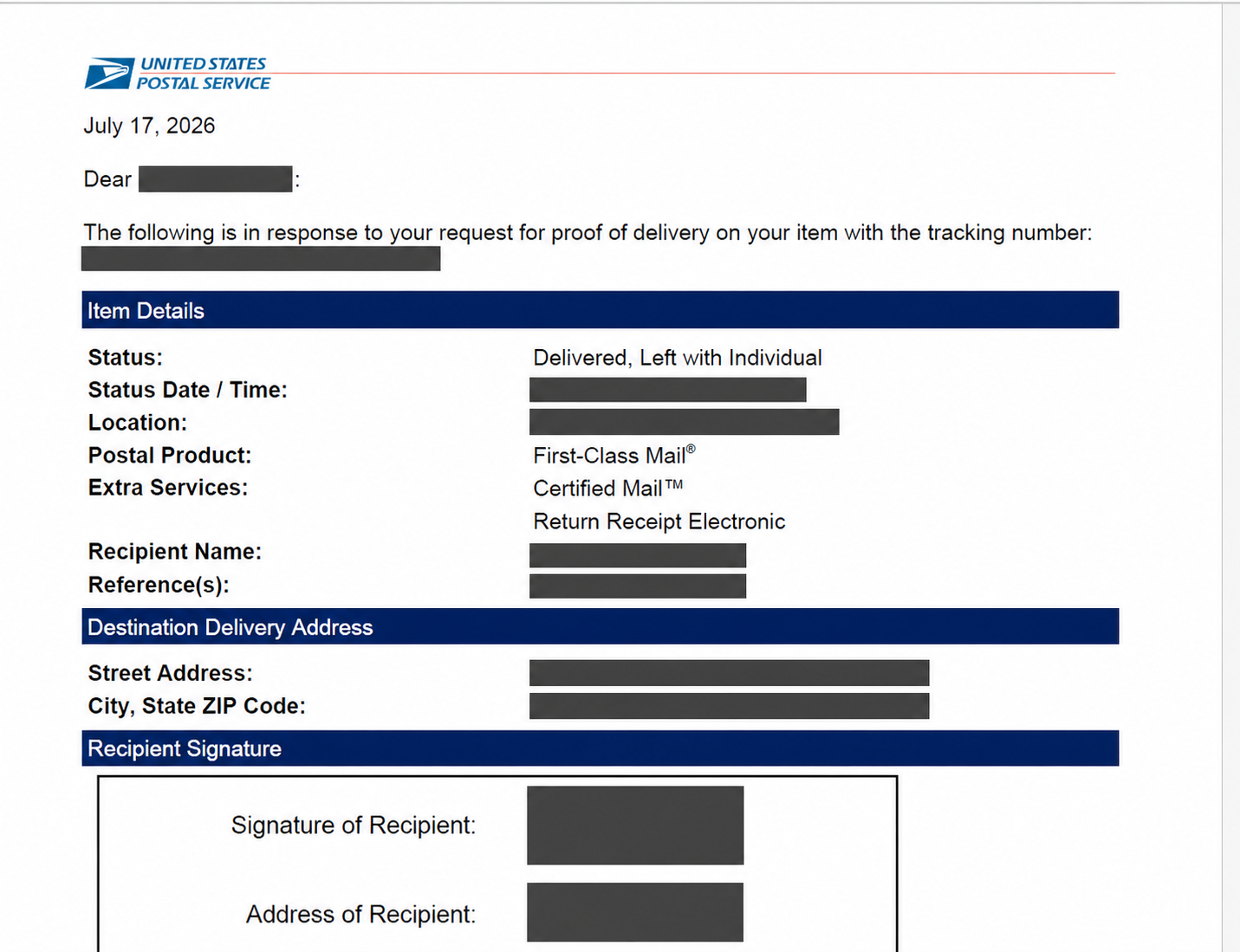
Electronic Return Receipt (ERR/eRR) is an optional digital delivery record for USPS Certified Mail. The redacted example shows the delivery status, date and time, delivery address, and recipient signature fields.
Choose it in the mailing options if you need a signature record for your files. Account holders can download the receipt from Mail Jobs once it's available. The receipt may appear after tracking shows delivery.
Electronic Return Receipt is an add-on of +$2.00. A physical Return Receipt is a separate option that USPS mails back as a paper green card.
Track Your Letter and Download Your Receipt
Keep your mailing status and records together in your TLP dashboard. The example highlights where to check tracking and download a selected Electronic Return Receipt.
- Sign in before ordering. Send while signed in so this mailing appears in your dashboard. You can create an account for saved mailing records.
- Open “Mail Jobs” and select your mailing. View its status, or use “Track Package” to open the latest USPS tracking details.
- Download your electronic receipt. If you selected Electronic Return Receipt, look under “Documents” in the mailing details. Click “Download” next to “Return Receipt” once USPS has issued the record and it is available.
Prefer to Send Without an Account?
No TLP account is required for a single mailing. Use your tracking number on USPS Tracking to check delivery updates. If you chose Electronic Return Receipt before mailing, select “Return Receipt Electronic” under “Available Actions” and enter your email address. USPS emails the signed delivery record after delivery and once the signature record is ready.
Need your USPS tracking number? Contact us with the job number from your order confirmation.
USPS electronic receipt instructions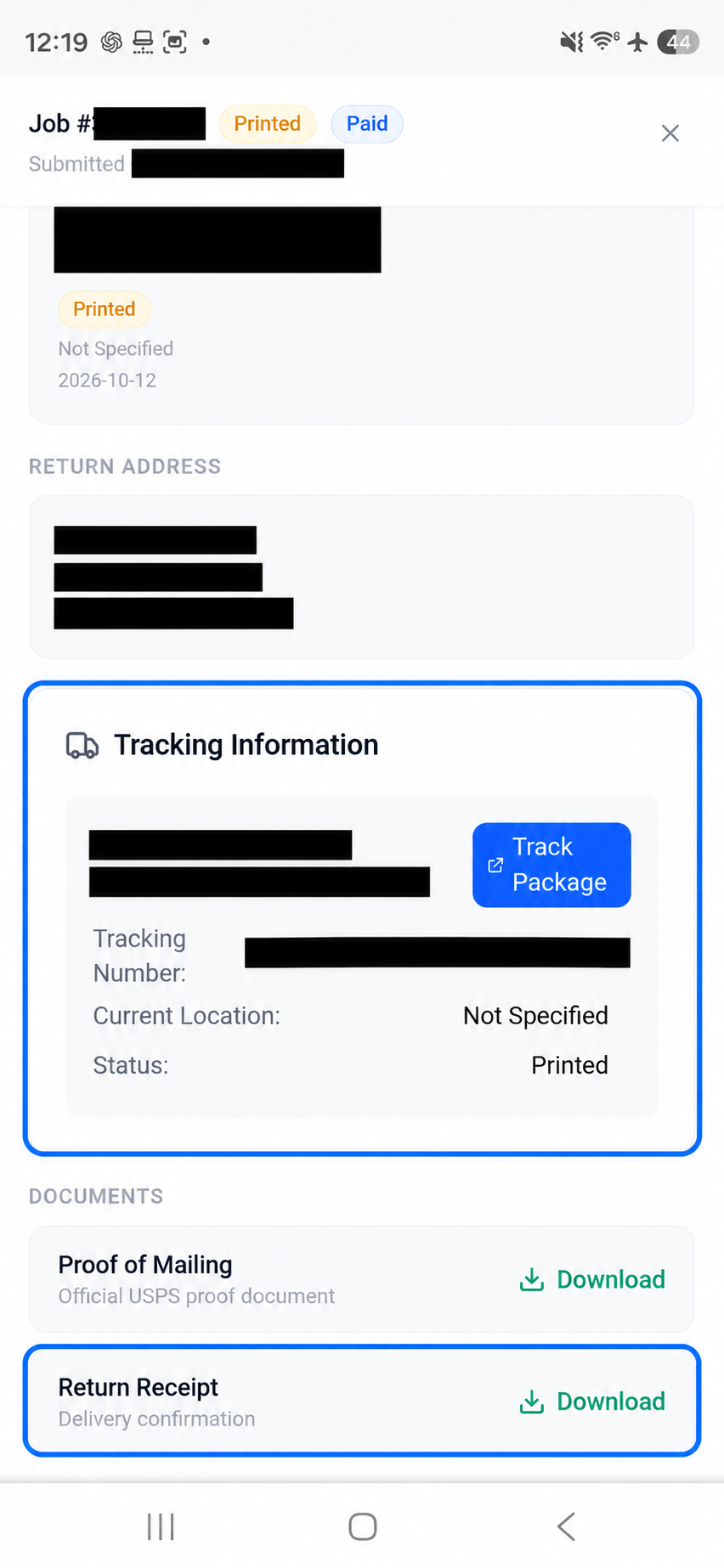
Certified Mail Pricing: Simple & Transparent
Starting estimate for one black-and-white page, including printing, envelope, Certified Mail postage, tax, and our service fee. Additional pages, color printing, and optional receipts change your total.
Printing Rates & Optional Receipts
- Black & white: $0.85 per page
- Color printing: $1.25 per page
- Electronic Return Receipt: +$2.00
Printing rates and receipt add-ons above are before applicable tax. Your final total is shown before payment.
Who Uses Certified Mail Online?
Use Certified Mail when you need a mailing record and delivery tracking for an important letter. Add Return Receipt when you also need a copy of the delivery signature for your files.
Legal Professionals
Attorneys, paralegals, and law firms can send demand letters and other correspondence with USPS tracking and available mailing records.
Property Managers & Landlords
Send lease termination notices, rent increase letters, and eviction notices with documented proof of mailing and delivery.
Small Business Owners
Mail contracts, important business correspondence, and official notices that need tracking and a delivery signature.
Individuals & Consumers
Send dispute letters, insurance claims, tax documents, or any correspondence where proof of delivery matters. Prepare your request with a certified letter template, a gym membership cancellation letter, or a security deposit deduction dispute letter.
Certified Mail Online: Frequently Asked Questions
Quick answers about tracking, proof of mailing, delivery time, and Return Receipt.
What proof do I get with Certified Mail?
When will my Certified Mail be mailed?
Is a signature required for Certified Mail?
Can I send Certified Mail to a PO Box with TLP?
How long does Certified Mail take to deliver?
Can I add Return Receipt to Certified Mail?
What's the difference between Certified and Registered Mail?
Is online Certified Mail the same as USPS Certified Mail?
Do I need an account to track Certified Mail?
Only need proof that you mailed a letter, without delivery tracking? Compare Certificate of Mailing vs. Certified Mail before choosing a service.
Mailing to a PO Box? See how Certified Mail delivery and signatures work for PO Boxes.
Helpful Certified Mail Guides
- How to send Certified Mail with USPS — follow the mailing steps, prepare the forms, and choose Return Receipt if needed.
- How to write a Certified Mail letter — prepare the letter and choose the records you need.
- Registered Mail vs. Certified Mail — compare security, mailing records, and costs.
- Certified Mail tracking — find your tracking number, read USPS updates, and access available receipts.
- USPS mail delivery times — how long First-Class and Certified Mail typically take.
Ready to Send Certified Mail?
Upload or type your letter. You can send a single mailing without an account.
Send with Certified MailUpdated